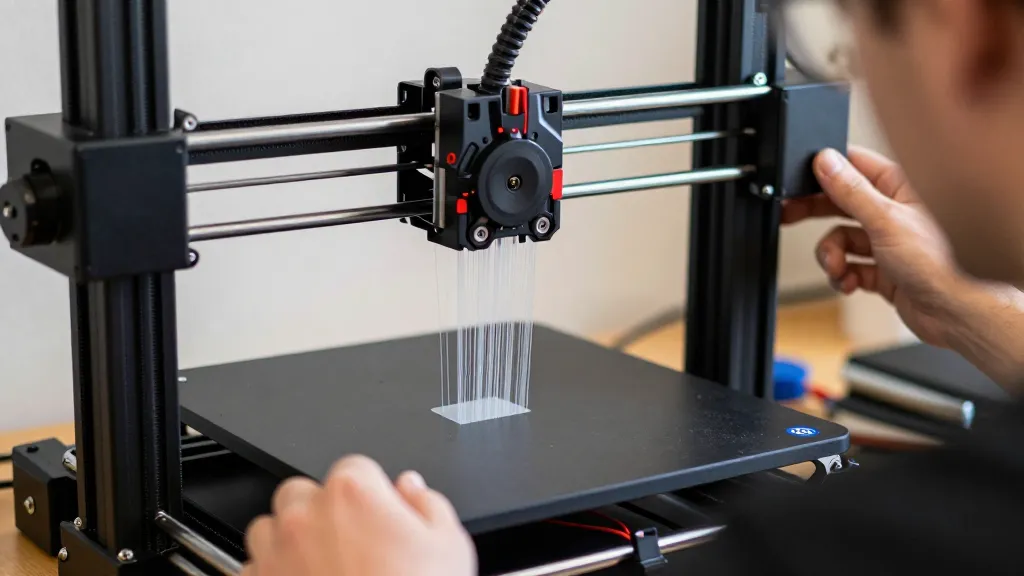
Stringing and oozing can ruin the quality of your PETG prints, leaving behind unsightly trails and messy surfaces. Whether you're a beginner or an experienced 3D printing enthusiast, these issues can be frustrating to deal with. How to fix PETG stringing and oozing is a common challenge, but with the right approach, you can significantly reduce these problems. This article provides practical solutions to help you achieve cleaner, more precise prints using PETG filament.
We'll start by explaining why PETG is prone to stringing and oozing, then move on to actionable fixes such as adjusting retraction settings and optimizing print speed. Proper filament drying also plays a crucial role in preventing these issues, and we'll cover the best methods to keep your PETG dry and ready to print.
For more advanced users, we'll explore firmware settings, pressure advance, and cooling optimization to fine-tune your printer for minimal stringing. Whether you're looking for quick fixes or long-term solutions, this guide offers a comprehensive overview of how to fix PETG stringing and oozing for better print results.
Understanding PETG Stringing and Oozing
PETG stringing and oozing are common issues in 3D printing, often frustrating users due to their impact on print quality. Understanding the root causes of these problems is essential for selecting effective solutions. PETG’s unique properties make it particularly susceptible to stringing and oozing, and addressing these issues requires a combination of technical adjustments and material care.
Why PETG Is Prone to Stringing and Oozing
PETG is prone to stringing and oozing due to its low melting point and high flow characteristics. When the extruder stops, the filament can continue to flow from the nozzle, resulting in unwanted strands. This behavior is exacerbated by PETG’s tendency to remain semi-liquid for longer periods, especially when printed at lower temperatures. The material’s high viscosity also means it can retain heat more effectively, contributing to the formation of strings between print areas.
How Stringing and Oozing Affect Print Quality
Stringing and oozing can significantly affect the aesthetics and structural integrity of 3D prints. Strings appear as thin, connected strands between different parts of the model, which can make the final product look messy or unprofessional. Oozing, on the other hand, can lead to small, unintended blobs or trails on the surface of the print, especially during pauses or retraction. These issues not only reduce the visual appeal of the print but can also compromise its dimensional accuracy and mechanical strength. By understanding how these problems arise, users can better tailor their printing settings and material preparation to achieve cleaner, more precise results.
Fixing PETG Stringing and Oozing
Retraction and print settings play a crucial role in minimizing PETG stringing and oozing. By fine-tuning these parameters, you can significantly improve print quality and reduce unwanted strings. This section provides actionable steps to optimize your setup for smoother, cleaner prints.
- Adjust retraction distance and retraction speed to minimize stringing.
- Use a higher retraction temperature to improve retraction performance.
- Optimize print speed and layer height for better flow control.
- Ensure the nozzle remains above the print bed when moving between areas.
- Fine-tune retraction settings to avoid over-retraction or under-retraction.
Retraction Settings for PETG
Retraction settings are one of the most effective ways to combat stringing in PETG. A retraction distance of 4–6 mm is typically sufficient, but this may vary based on your printer and filament. Retraction speed should be set to a moderate value, around 40–60 mm/s, to allow the filament to retract smoothly without causing vibrations. Increasing the retraction temperature slightly can also help, as PETG tends to be more viscous and may not retract properly at lower temperatures.
In addition to retraction distance and speed, retraction acceleration is important. A higher retraction acceleration can reduce the time it takes for the nozzle to move, which helps prevent stringing. However, be cautious not to set it too high, as this can cause mechanical stress on the printer's components. It's also important to ensure that the retraction settings are consistent across all areas of the print, particularly during travel moves.
Print Speed and Layer Height Optimization
Print speed and layer height are key factors in controlling how PETG flows during printing. Printing too slowly can lead to oozing, while printing too fast may cause inconsistent extrusion. A print speed of 40–60 mm/s is often ideal for PETG, as it allows for better flow control and reduces the chance of stringing. Lowering the speed slightly for complex geometries or overhangs can further improve print quality.
Layer height also affects stringing and oozing. A layer height of 0.2 mm or less is generally recommended for PETG, as it reduces the amount of filament that can ooze between layers. However, a slightly higher layer height, such as 0.25 mm, can be used if you're prioritizing print speed over surface detail. Adjusting the layer height in conjunction with print speed can help achieve a balance between print quality and efficiency.
The Role of Dry Filament in Reducing Stringing
Moisture is a common culprit behind stringing and oozing in PETG prints. When PETG filament absorbs humidity, it can lead to inconsistent extrusion, bubbling, and poor layer adhesion, all of which contribute to stringing issues. Ensuring your filament is dry is a fundamental step in reducing these problems and improving overall print quality.
Why Moisture Causes Stringing in PETG
PETG is hygroscopic, meaning it readily absorbs moisture from the air. When filament is exposed to humidity, the water molecules can become trapped within the polymer structure, leading to internal stress during printing. This stress causes the filament to ooze and string as it extrudes, especially during rapid movements or retraction. Moisture also affects the melting process, making the filament less viscous and more prone to stringing. Additionally, wet PETG can lead to bubbling at the nozzle, which disrupts the flow and results in poor layer adhesion. Keeping moisture levels low is essential for consistent extrusion and high-quality prints.
How to Dry PETG Properly
To dry PETG properly, use a filament dryer or store it in a desiccant bag with silica gel. These methods help remove moisture content to below 0.05%, ensuring optimal extrusion and minimizing oozing. A filament dryer is ideal for large quantities, while desiccant bags are suitable for smaller spools. Place the filament in a sealed container and store it in a cool, dry place away from direct sunlight and humidity. Regularly check for signs of moisture, such as bubbles or a musty smell, and replace the desiccant if necessary. Proper storage ensures that PETG remains dry and performs reliably during printing.
Advanced Settings for Preventing Stringing and Oozing
Advanced settings play a crucial role in preventing PETG stringing and oozing. By fine-tuning firmware, extruder performance, temperature, and cooling, you can significantly improve print quality and reduce unwanted strings. These adjustments require careful testing and understanding of how each parameter affects the extrusion process.
- Enable pressure advance in the firmware to improve flow control.
- Use a high-quality extruder with a smooth, heated nozzle.
- Adjust the nozzle temperature to match the ideal range for PETG.
- Optimize the cooling settings to reduce excess melting.
- Use a purge tower to test and fine-tune retraction and flow settings.
Pressure Advance and Firmware Settings
Pressure advance is a firmware feature that helps manage the flow of filament during printing. It compensates for the delay between the extruder motor movement and the actual extrusion, which is particularly important for materials like PETG that are prone to stringing. Enabling pressure advance can significantly reduce stringing by ensuring consistent extrusion pressure and flow control.
Nozzle Temperature and Cooling Optimization
Maintaining the correct nozzle temperature is essential for preventing PETG stringing. PETG typically requires a nozzle temperature between 210°C and 230°C, depending on the specific filament and printer setup. Too low a temperature can cause under-extrusion and poor layer adhesion, while too high a temperature may lead to excessive melting and stringing. Finding the right temperature balance is key to achieving clean prints.
Cooling settings also play a vital role in managing PETG stringing. While PETG does not require aggressive cooling like PLA, excessive cooling can cause the filament to cool too quickly, leading to stringing. Adjusting the cooling fan speed and ensuring proper airflow can help maintain an optimal temperature gradient, reducing the likelihood of stringing during the print.
Troubleshooting and Fine-Tuning for PETG
Troubleshooting and fine-tuning PETG prints requires a methodical approach to ensure optimal results. By monitoring print quality, testing different settings, and maintaining a detailed log, you can systematically improve your printing experience and reduce stringing and oozing.
Testing and Adjusting Settings
To effectively test and adjust settings, start by printing a small test piece and observing the print quality. Look for signs of stringing, oozing, or inconsistent flow. Adjust retraction distances and speeds incrementally, and note how each change affects the print. A temperature tower can also help identify the ideal nozzle temperature by printing layers at different temperatures and assessing layer adhesion and surface finish. This process allows you to find the right balance between print quality and reliability.
Maintaining a Settings Log for Future Prints
Maintaining a settings log is essential for tracking what works and what doesn’t. Record details such as nozzle temperature, retraction settings, print speed, and layer height alongside the results of each print. This log will help you quickly recall optimal configurations for future projects and identify patterns that may contribute to stringing or oozing. Additionally, it enables you to refine your approach over time by comparing past prints and making data-driven adjustments for better consistency and performance.
Frequently Asked Questions
What causes stringing in PETG and how can I fix it?
Stringing in PETG is often caused by poor retraction settings, excessive extrusion temperature, or inadequate cooling. To fix it, adjust retraction distance and speed, optimize print speed, and ensure proper cooling.
How do I dry PETG filament to prevent oozing?
PETG absorbs moisture, which leads to oozing. Dry the filament using a desiccant or a food dehydrator at 50°C for 12-24 hours. Store it in an airtight container to maintain dryness.
What retraction settings work best for PETG?
Retraction distance for PETG typically ranges from 1.5 to 3 mm, with retraction speed between 40 to 60 mm/s. These settings help minimize stringing during travel moves.
Can I prevent oozing by adjusting the nozzle temperature?
Adjusting the nozzle temperature can help reduce oozing, but it's not the sole solution. Lowering the temperature slightly (to 210-220°C) can decrease stringing, but proper retraction and drying are more effective.
Final Thoughts
By understanding the causes of PETG stringing and oozing, you can implement practical fixes such as optimizing retraction settings, adjusting print speed, and ensuring filament dryness. These adjustments significantly improve print quality and reduce issues.
Maintain a settings log to track what works best for your printer and filament. Regularly test and fine-tune your settings to achieve consistent, high-quality prints with PETG.